.jpg)

There's a moment in every subscription that nobody has ever built for. A subscriber clicks cancel. The confirmation goes through. The status flips to "Cancelled." And then — they're still there. Still on the portal. For a few seconds, they're a customer who has left but hasn't gone anywhere yet.
Every brand treats that moment as over. The next thing that happens is a win-back email three days later, landing in a promotions tab next to forty others, asking someone to walk back into a portal they deliberately walked out of. It's the coldest possible restart — and until now, it's the only play anyone had. Instant Winback Offers change that.
Usually, nothing — and that's the problem.
Think about how much work happens before someone cancels. Reward journeys. Surprise-and-delight in the portal. Reason-based treatments. Offers tuned to the exact reason they gave. Every proactive lever a good retention stack has, firing to reach a subscriber while they're still a subscriber.
And then some of them cancel anyway, because sometimes people genuinely mean it. Here's the thing: that's not where your relationship with them ends. It's where your tooling ends. The subscriber who just cancelled is sitting on your portal, cancellation confirmed, the decision maybe four seconds old — and the only thing left in the toolkit is that email in three days.
Three days is a long time for a decision that new. Give it 72 hours and "I cancelled" stops being something they did and starts being who they are. Right now, it's still just a click. The highest-intent moment in the entire lifecycle is the one moment brands have had no mechanism for.
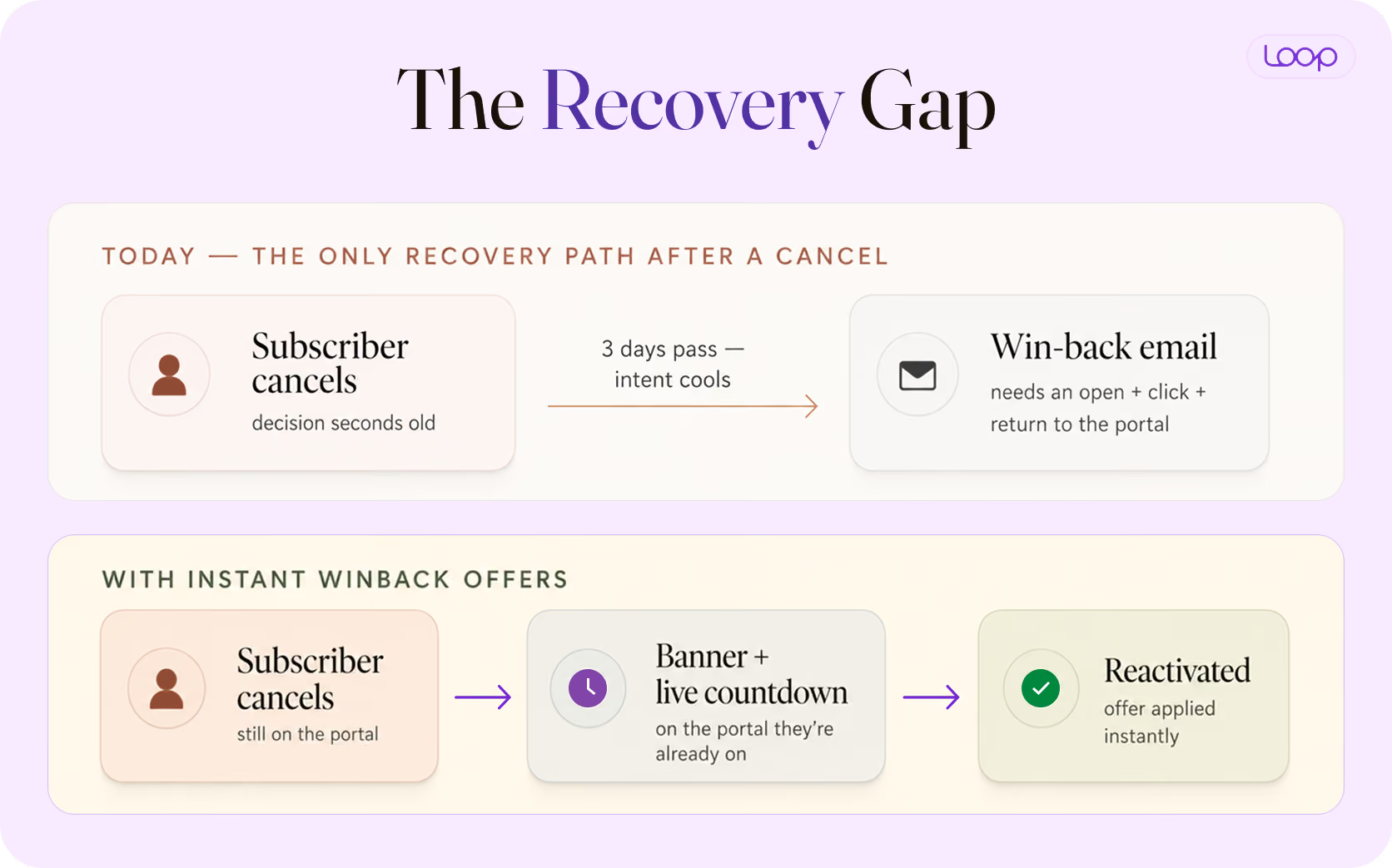
Instant Winback Offers are a post-cancellation retention offer that appears in the customer portal the instant a subscriber confirms their cancellation. Instead of waiting for a win-back email, you get one more attempt in the same session — while intent is still warm and the subscriber is still on the page.
It's a distinct layer from the offers inside your cancel flow. A cancellation flow works to save someone before the cancellation completes. Instant Winback Offers work after it's done — a genuinely new surface, and the reason this is the first tool of its kind.
The whole thing is three steps for the subscriber, and zero friction added to the cancel path:
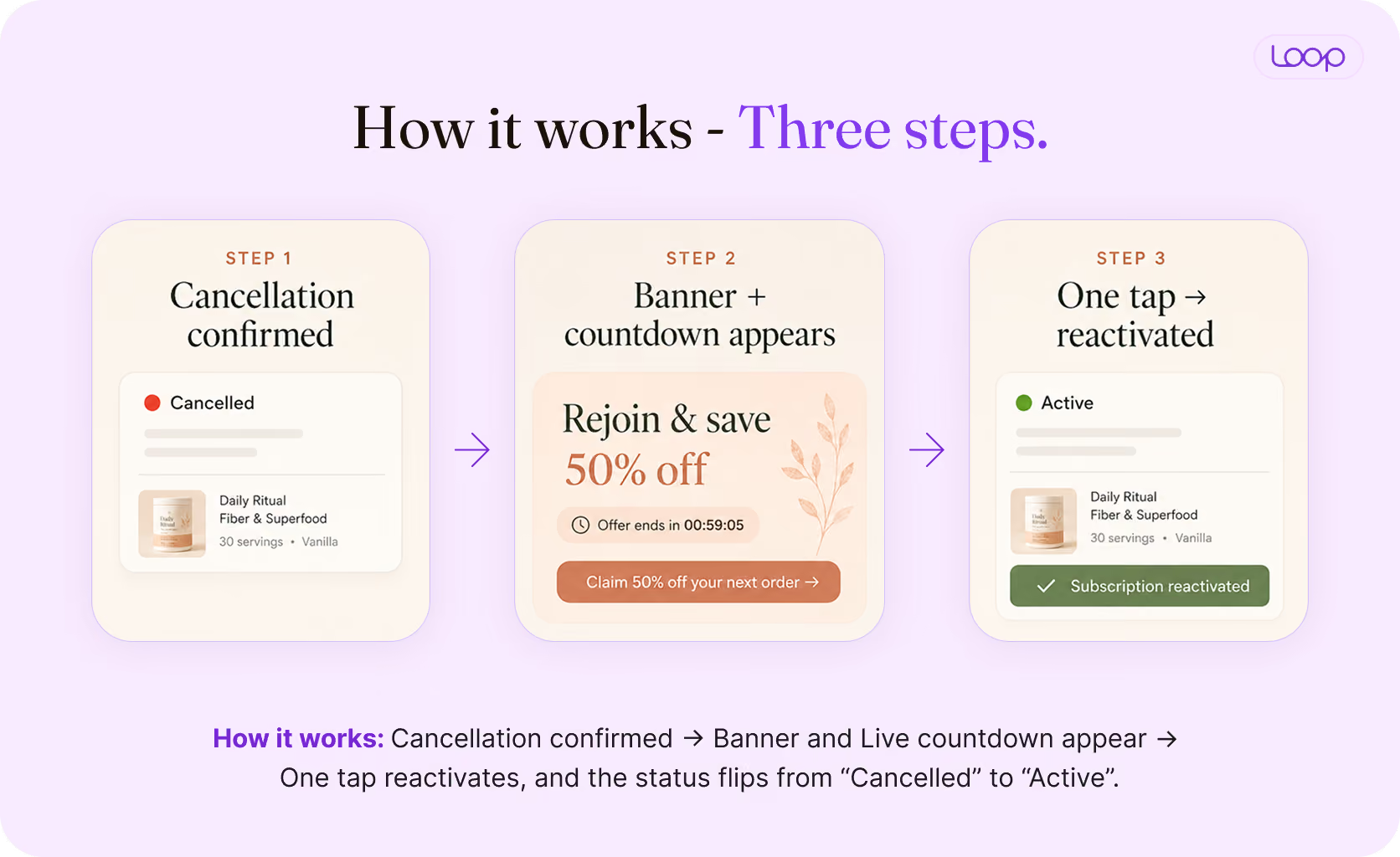
You control the validity window (1 to 24 hours), cool-off settings, the incentive, and the banner and drawer copy — and it gets its own line in the same Saves tab as your other retention offers, on the same save-rate definition, so the two are directly comparable.
Every retention tool until now has worked before the cancellation completes — stacking escalating offers on the way out the door. That approach has a hidden cost: a mid-flow offer gets accepted by plenty of subscribers who were never actually going to leave. You end up paying to keep people you already had.
Instant Winback Offers flip that. The offer only appears once the cancellation is confirmed, which means only people who genuinely left ever see it. That changes two things:
It's also fully compliant with the FTC's click-to-cancel direction: the cancellation stands no matter what the subscriber does with the offer, and nothing is added to the cancellation path itself.
In its early stage release — the first 30 days — 152 stores running the feature, brands configured 187 offers and recovered 696 subscriptions — about $39,000 in MRR that would otherwise have walked. All of it incremental to what those brands' existing flows were already catching.
The incrementality shows up cleanly at the store level, too. One brand switched it on with a single banner, Loop's default drawer copy, and no segmentation — the offer simply shown to everyone who cancels. In 10 days it recovered 44 subscriptions its flow had already lost, nudging its overall save rate from 16.1% to 17.0%. That last point of save rate is usually the hardest one to find — and it came from a surface that used to be empty.
If you're already running Loop's cancellation flows, you can turn on your first Instant Winback Offer in under a minute — here's the setup doc.
Setup takes about a minute, and default copy ships with it so you can go live without writing anything from scratch. In your Loop admin, go to Retain → Cancellation flows → Instant winback offers, then:
For the full step-by-step and field definitions, see the Instant Winback Offers help doc.
The banner carries the visual load, but the offer is where the save is won — and because everyone who sees it has already left, this is the place for your strongest structure. Here's how brands across different categories are configuring theirs, anonymized, one per vertical, with what each is doing and why it works.
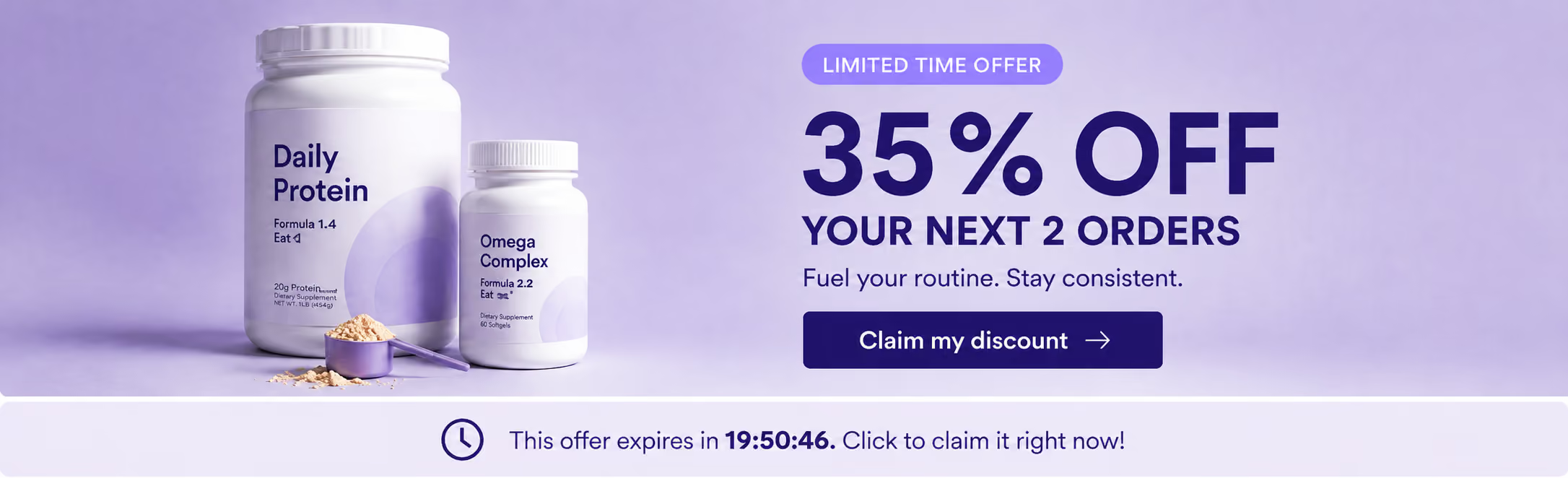
A time-boxed "% off your next N orders" instead of a flat discount. It's steeper than an everyday offer, but capped at two orders, so it protects LTV. The benefit is reframed to the category — results build over months, not days — which speaks to why a supplement subscriber shouldn't break their streak. The CTA names the reward, and the countdown is baked into the banner itself.
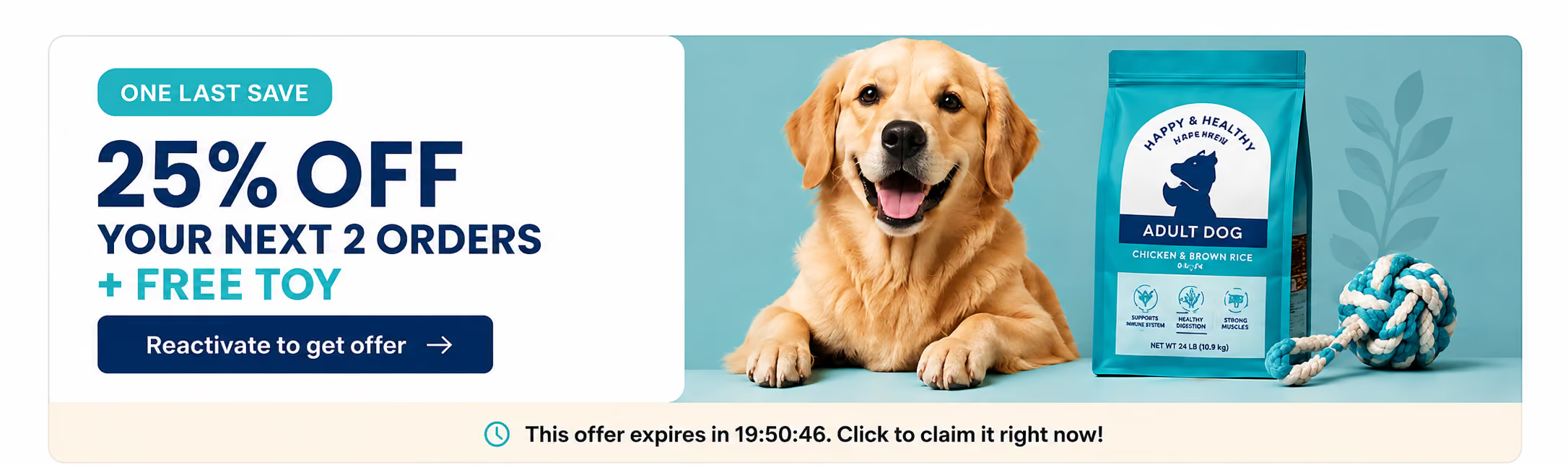
The richest structure in the set: a discount stacked with a free gift, and a drawer that does more than restate the price. It lists exactly what reactivating restores (subscriber discount, rewards, free shipping), adds trust markers (a guarantee and a customer count), and keeps the choice to two options — reactivate, or later. The offer, the benefits, and the timer all live in one view.
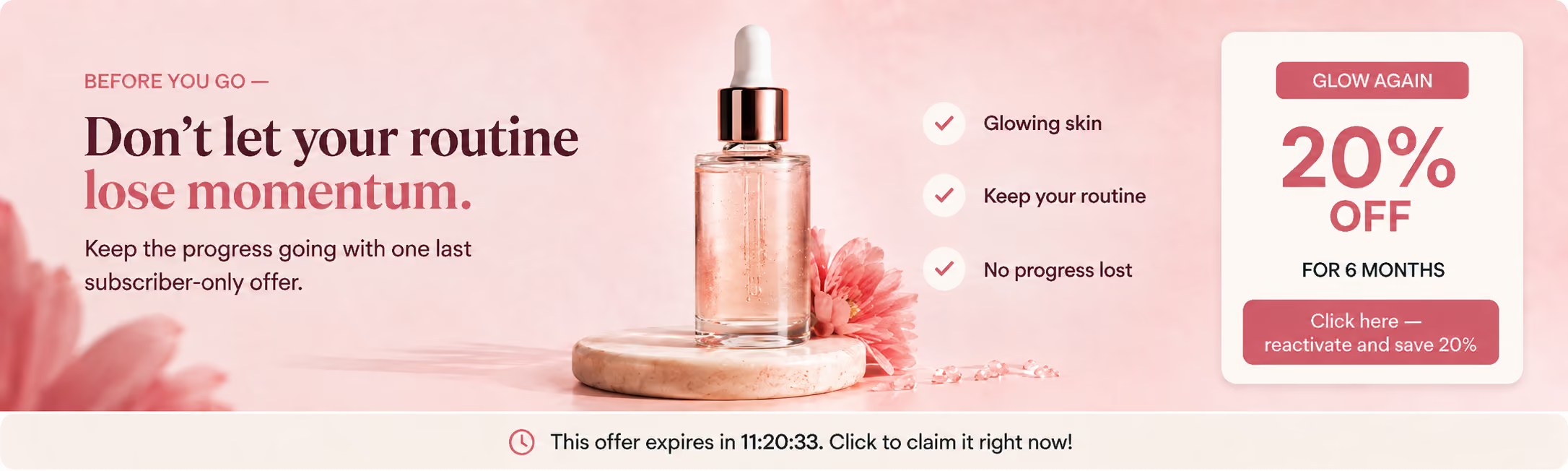
Skincare results take weeks, so the offer is framed around time — 20% off for 6 months — matching how long the product actually takes to work. The benefit copy reframes leaving as interrupting progress, and "Restart my routine" makes the CTA about the outcome, not the transaction.
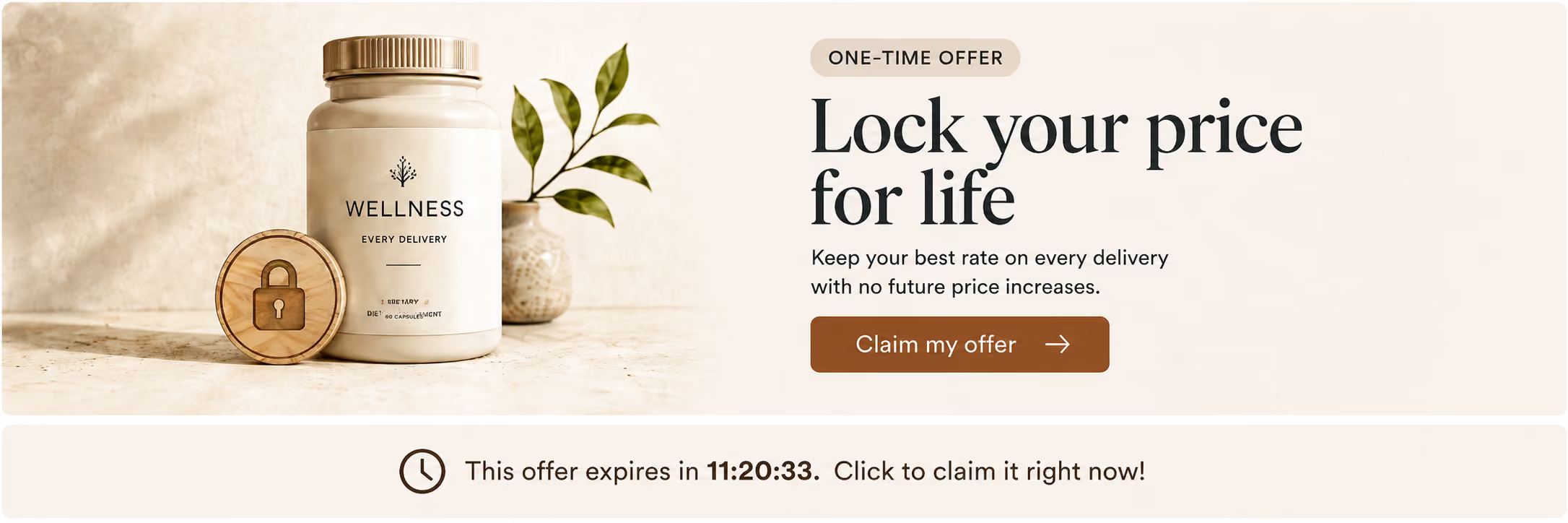
Instead of a coupon, this reframes the offer as a permanent price. For subscribers who left over cost, "lock your price for life" reads as a status upgrade, not a bribe — a one-time reason to return that a recurring discount can't match. Note the CTA verb: "Lock my price," not "Reactivate." The action is the benefit.
The banner is merchant-uploaded and looks like your store, not a Loop widget — which is the point. Same feature, completely different look in every brand.
This is built for Shopify subscription brands with enough cancel volume for a save rate to actually move — brands already running retention offers and starting to hit a ceiling on them. If that's you, this is the surface you haven't tapped yet, and it slots neatly into a complete approach to reducing subscription churn.
It's honestly not the right first move for brands with very low cancel volume, or brands whose only lever is price — a steep offer there just resets expectations. Proactive retention should still do the heavy lifting. This is what catches the rest.
Q. Isn't this just paying people to leave?
It's the opposite. A mid-flow offer gets accepted by subscribers who were never going to cancel — you pay to keep people you already had. Here, only confirmed cancellers see the offer, so every acceptance is revenue that was already at zero.
Q. Won't my subscribers learn to cancel just to get the discount?
Cool-off settings cap how often the same subscriber can see an offer, and you control the validity window. You decide the frequency, not the subscriber.
Q. I already send win-back emails — how is this different?
It's a completely different moment. An email arrives days later, needs an open, and needs the subscriber to walk back into a portal they just left. This is in-session, on the portal they're already on — one tap, with reactivation applied automatically.
Q. Won't a steep offer wreck my LTV?
You set the incentive and the duration — three orders, not for life, if that's the call. And because it reports into the same Saves tab as your retention offers, with the same save-rate definition, you can measure its impact directly rather than guessing.
Q. Does this make cancelling harder?
No. The offer only appears once the cancellation is confirmed. Nothing is added to the cancellation path, and the cancellation stands regardless of what the subscriber does with the offer — so it stays on the right side of click-to-cancel rules.
Proactive retention gets you most of the way — the reward journeys, the reason-based offers, the pause-instead-of-cancel prompts. But there's a whole category of subscribers those levers will never reach: the ones who meant it and left anyway. For years, the only thing waiting for them was an email nobody opens.
Now there's a last line. The cancellation goes through, a banner appears, the countdown starts — and the subscription can be alive again before the tab is closed. If you're already running Loop's cancellation flows, Instant Winback Offers are live in your dashboard today. Turn one on, and stop letting your highest-intent moment be the one you have no tool for.