.avif)

Loop MCP lets you ask your Loop subscription data a question in plain language — inside the AI assistant you already use — and get a live, accurate answer back in the chat. No dashboard, no export, no screenshots. It's read-only, connects in about two minutes, works with any MCP-compatible assistant (Claude, ChatGPT, Gemini, Perplexity, Cursor, Windsurf and more), and it's live today.
.gif)
Every subscription operator asks the same thing on a Monday: how's churn? You can see it's up. You just can't see why — because the answer is split across tabs. Churn is on one; last month's promo is on another; nobody put them next to each other.
Finding the connection takes hours, and someone who knows exactly where to look. Most retention teams have neither — and some are about to hire for it. The data was never the problem. Deriving the insight to make a decision from it was.
Loop MCP is Loop's connector for the Model Context Protocol — the open standard AI assistants use to connect to the data and tools you already work with.
In plain terms, it's a Shopify MCP for subscription data: it connects your live Loop analytics to the AI you already use, so you can ask a question in plain words and get the answer — with the correlation found for you — right in the chat.
Ask "why did churn go up last month?" and instead of a lone number you get the story:
.jpg)
The churn spike wasn't new subscribers leaving — it was discount-hunters from last month's promo who were only ever going to stay a cycle. A churn problem that was really an acquisition decision. That's the kind of thing you'd normally need a data analyst to dig out. Here, it's one prompt.
Because Loop MCP reaches across the whole subscription journey — acquisition, revenue, payments, cancellations, cohorts and saves — you're never stuck in a single report. Ask a layered question and it pulls what it needs, builds the breakdown, and hands back something you can act on. These are real prompts — paste, adapt, done:
Keep probing — every answer starts the next question. A dashboard tells you what moved; a conversation tells you why, and names the lever to pull.
Want a running start? Grab the Loop MCP prompt library — a ready-made set of prompts for churn, cohorts, payments and more, built to paste straight in.
If you run more than one brand, this is where it pays off. Instead of logging in and out of a dozen dashboards to ask the same handful of questions, one connection covers every client store — switch between them by name, in the same chat, and line the answers up.
Do that and you see what no single brand can: the pattern across your whole book, or the tactic working for one client that you should be running for four. You walk into a QBR with the answer in the two minutes before the call, not the two hours before it.
And once you know the view you want in front of you every morning, you don't have to stitch it together from custom reports. Describe it in plain words, and with Loop MCP and Loop's API you can build the dashboard your business actually needs — no engineering ticket, no analyst in the loop.
Can you trust an AI quoting your numbers? Yes — Loop MCP doesn't calculate anything of its own. It reads the same live figures from the same Loop API your admin dashboard runs on, and names the query behind every answer so you can check it. And it's read-only: it reports your data, it never writes to or changes it.
The good news: this barely counts as setup. You do it once. Here's how it looks in Claude — it's much the same in every assistant:
The setup guide has dedicated walkthroughs for Claude and ChatGPT, plus a general section that covers any other MCP-compatible assistant — Gemini, Perplexity, Cursor, Windsurf and more.
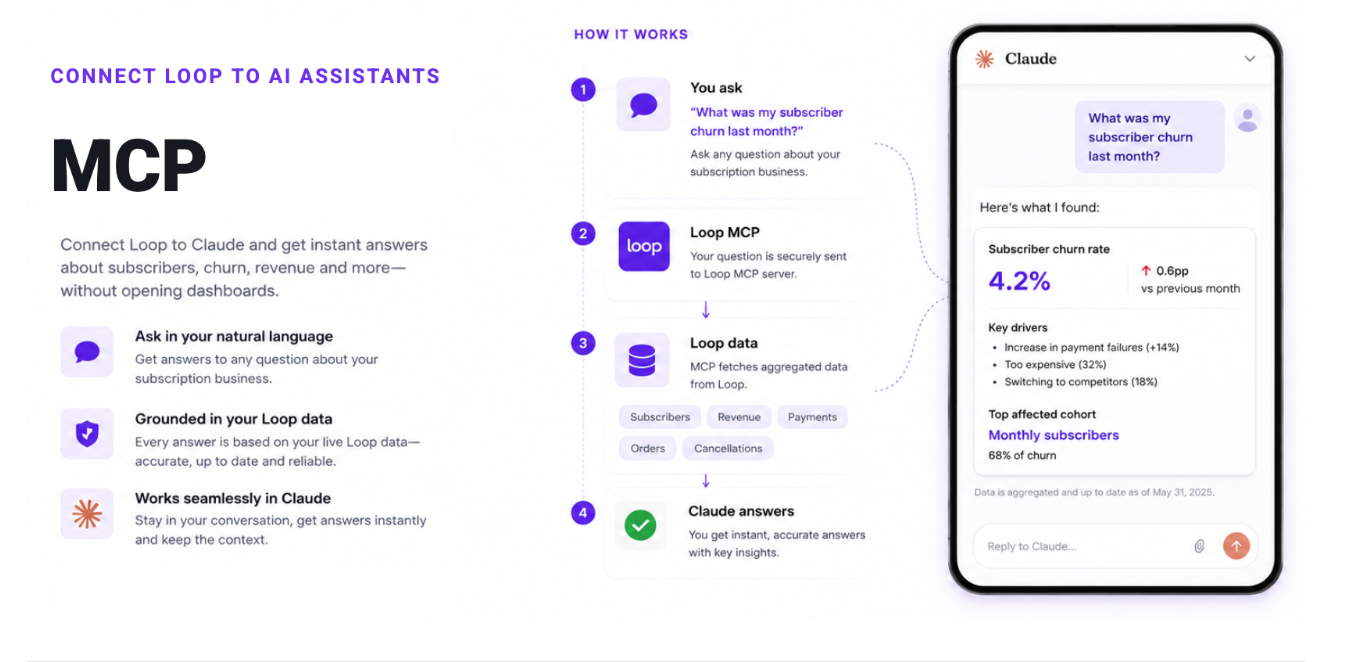
Right now, Loop MCP turns your live subscription numbers into a conversation — you ask, it answers, right where you work.
And we're just getting started. Up next: Loop MCP that reads the automations behind those numbers — your flows, and how each one is built. So it won't just say churn moved; it'll point to the flow that moved it, and what to fix inside it. The first of several modules landing soon.
What is Loop MCP?
Loop MCP is a connector that links your Loop subscription data to AI assistants using the Model Context Protocol (MCP). You ask about churn, cohorts, payments, cancellations and saves in plain language and get live answers, pulled from your own Loop analytics, inside the chat. It's read-only and connects in about two minutes.
What is MCP (Model Context Protocol)?
MCP is an open standard that lets AI assistants connect to external tools and data. Because it's a shared standard, one Loop connector works across any MCP-compatible assistant — so your subscription data becomes something you can query in the assistant you already use.
Which AI assistants does Loop MCP work with?
Any assistant that supports custom MCP connectors — including Claude, ChatGPT, Gemini, Perplexity, Cursor and Windsurf. You add Loop as a custom connector once. Setup varies slightly by assistant; the setup guide has dedicated steps for Claude and ChatGPT and generic steps for the rest.
Is my subscription data safe?
Yes. Loop MCP is read-only — it never writes to or changes your store. You connect with your own Shopify login, access is granted per user in Loop Settings, and every answer is scoped to the store you're connected to.
Do the answers match my Loop dashboard?
They should — every answer is a live call to the same Loop API your dashboard uses, with the same definitions, and the assistant names the query it ran so you can verify it. If it can't fetch something, it says so rather than inventing a number.
How do I connect Loop to my AI assistant?
Turn on MCP access in Loop Settings, add mcp.loopwork.co/mcp as a custom connector in your assistant, sign in with your Shopify store, and connect. The setup guide has dedicated steps for Claude and ChatGPT, plus a general section for any other MCP-compatible assistant.
The dashboard is there when you want to explore. But when you just need the answer — how's churn, and what drove it? — you shouldn't have to dig for it. Loop MCP makes it one line in a conversation you're already having, backed by your live numbers.
Loop MCP is live today. Connect it in about two minutes, or book a demo to see it on your own stores. For more on what it surfaces, see Loop's dunning management and the guide to reducing subscription churn.