.avif)

She subscribed eight months ago. She loved the product. She told her friends about it. She left a five-star review.
Then she clicked "Cancel subscription."
Not because the product failed her—but because nobody asked why she was leaving. Nobody offered an alternative. Nobody reminded her that she was two orders away from a free gift.
This is the subscription cancellation problem most Shopify brands get wrong. They treat the cancel button as an endpoint. A door that swings one way. But the data tells a different story: brands with well-designed cancellation flows save 20-40% of subscribers who initiate cancellation. That's not a typo. Nearly half the people who click "cancel" can be retained—if you give them a reason to stay.
The average subscription business loses 5-7% of subscribers every month to voluntary churn. For a brand doing $500K in annual recurring revenue, that's $25,000-$35,000 walking out the door every month—from subscribers who could have been saved with the right intervention at the right moment. And acquiring a new subscriber costs five times more than retaining an existing one.
This guide walks you through exactly how to build a subscription cancellation flow on Shopify that transforms "I'm done" into "I'll stay." We'll cover the strategy, the screens, the psychology, and the specific Loop Subscriptions features that make each step possible.
Before you build a cancellation flow, you need to understand what's actually driving cancellations. Here's what the data shows across thousands of Shopify subscription brands.
Voluntary churn—subscribers actively choosing to leave—accounts for 60-80% of total subscription churn. The remaining 20-40% is involuntary churn from failed payments, expired cards, and processing errors. Both matter, but they require fundamentally different solutions.
The most common reasons subscribers voluntarily cancel fall into predictable categories: they have too much product and are overstocked, they find it too expensive or their financial situation has changed, they want a different product or variety, they need a temporary break but see cancellation as their only option, or they feel the product didn't meet expectations.
Here's what most brands get wrong: they treat cancellation as binary. Subscribe or cancel. Stay or leave. But most cancellation reasons have a middle ground—a subscriber who has too much product doesn't need to cancel, they need to skip. Someone who finds it too expensive doesn't need to leave, they need a discount. Someone who needs a break doesn't need to end their subscription, they need to pause.
A subscription cancellation flow bridges this gap. It intercepts the cancellation intent, understands the reason, and presents the right alternative. Without one, you're letting every at-risk subscriber walk through the same exit door—regardless of whether they actually wanted to leave.
A cancellation flow that saves 20-40% of churning subscribers isn't a single screen with a discount code. It's a structured, multi-step journey that does four things: reminds subscribers of the value they're about to lose, collects the real reason they want to leave, presents a personalized alternative based on that reason, and only then—if nothing else works—lets them go gracefully.
Let's break down each step.

When a subscriber clicks "Cancel subscription" in their customer portal, the first screen they see shouldn't be a confirmation button. It should be a benefits page—a clear reminder of everything they're about to give up.
In Loop's cancellation flow builder, this is the "Before you go…" screen. It typically includes the subscriber discount they'll lose (e.g., "15% off every order"), shipping benefits like free delivery on all subscriptions, any accumulated loyalty points or rewards, and upcoming perks they're close to unlocking.
This works because of loss aversion—a psychological principle where people feel losses roughly twice as strongly as equivalent gains. Showing a subscriber they have 500 loyalty points worth $5 that will expire is more motivating than offering them a new $5 discount. They already feel ownership over those points.
If your brand uses Loop Flows for gamified rewards, this screen becomes especially powerful. A subscriber who sees "You're 1 order away from a FREE gift!" is far less likely to proceed with cancellation. They're invested in the journey.
Two buttons close this screen: "I still want to cancel" (which proceeds to the next step) and "Never mind, I'll stay" (which returns them to the portal). Data across Loop merchants shows that 10-15% of subscribers turn back at this step alone—before you've even asked why they're leaving.
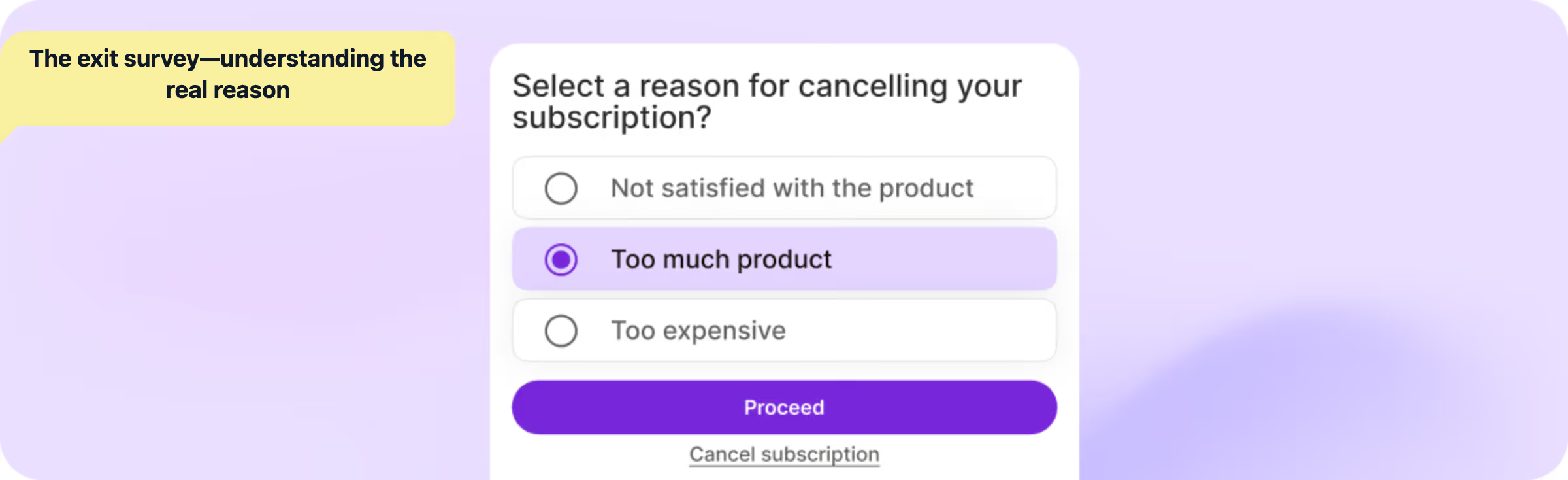
For subscribers who proceed past the benefits page, the next screen is the exit survey. This is the most important data collection point in your entire subscription program.
The exit survey captures the specific reason behind cancellation intent. Common options include "I have too much product right now," "It's too expensive," "I want a different product," "I need a break," "My needs have changed," and "Other reason" with a free text field.
The key insight here is that each reason maps to a specific save action. Loop's cancellation flows support 20+ segmentation attributes, meaning you can create highly targeted responses based on the reason selected, the subscriber's order count, their total lifetime spend, the specific products in their subscription, and even their customer tags.
This isn't just about retention—it's about intelligence. Every exit survey response feeds your subscription analytics, helping you spot patterns. If 40% of cancellations cite "too much product," that's a signal to adjust your default delivery frequency. If "too expensive" spikes after a price increase, you have actionable data to inform your pricing strategy.
This is where the magic happens. Based on the reason selected in the exit survey, Loop's cancellation flow presents a tailored alternative—not a generic discount, but a specific solution to the subscriber's stated problem.
The difference between a generic "Stay and get 10% off" and a reason-matched "No problem! Skip your next delivery instead" is the difference between a 10% save rate and a 40% save rate. The subscriber who has too much product doesn't need a discount—they need permission to skip. The subscriber who finds it expensive doesn't need a skip—they need a price break.
Loop also supports multiple offer types within a single flow. You can present a discount offer, a pause option, and a product swap simultaneously—letting the subscriber choose the alternative that fits their situation. The copy reads: "Choose the option that works best for you." This approach acknowledges that you might not guess the perfect offer, but you can give them the right options.
For brands using Loop's upsell engine, the cancellation flow can even suggest alternative products. A subscriber cancelling because they "want something different" can see personalized recommendations—"Subscribers who switched from Chocolate loved our Vanilla Bean"—with a one-click swap.
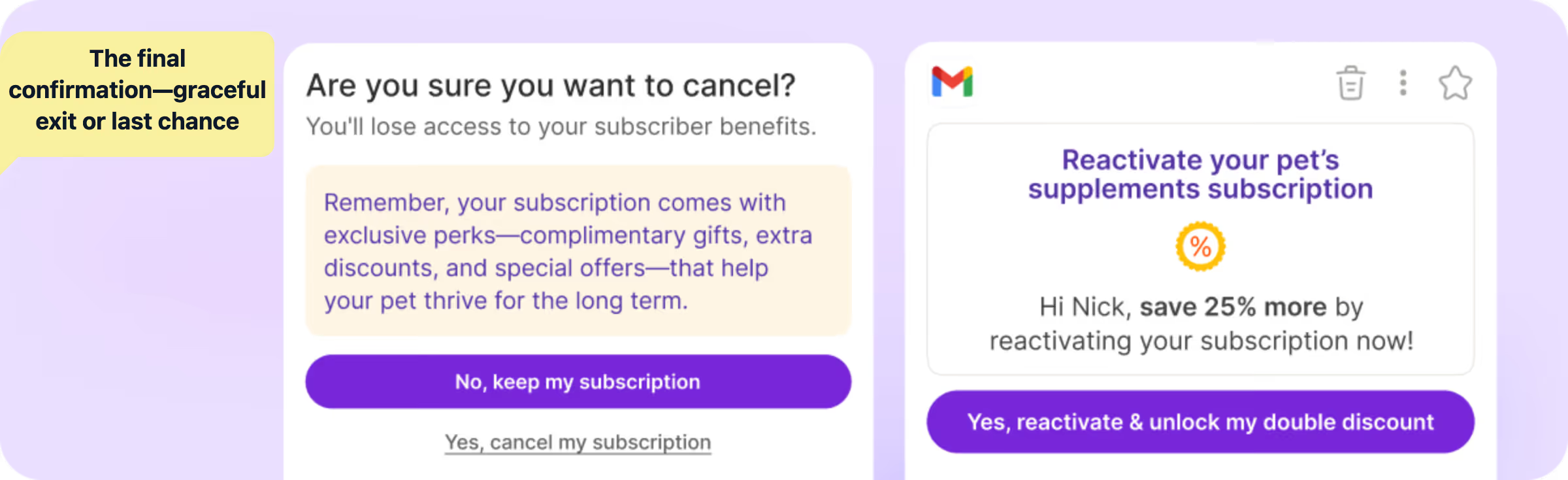
For subscribers who decline all offers, the final screen asks: "Are you sure you want to cancel?" with a clear reminder of what they're losing—"You'll lose access to your subscriber benefits."
Two buttons: "Yes, cancel my subscription" and "No, keep my subscription." This is the last touchpoint, and even here, 5-10% of subscribers change their mind.
After cancellation, the confirmation screen should include a reactivation path: "Changed your mind? Reactivate anytime." Paired with Quick Actions—magic links that let subscribers reactivate in one click from an email or SMS—this creates a frictionless path back.
A basic cancellation flow with benefits, survey, and offer will save 15-20% of churning subscribers. To reach 30-40%, you need advanced tactics that go beyond the standard playbook.
The biggest mistake brands make is offering their best discount on the first screen. If a subscriber was going to stay for a simple reminder, you've now trained them to expect a discount every time they consider cancelling.
The smarter approach is escalating incentives. Start with no discount at all—just the benefits reminder. Then offer a small incentive matched to their reason (skip, swap, pause). Only at the final stage do you bring out the heavier offer—a 20% discount, a free gift, or an extended pause.
This preserves margin on easy saves while still capturing subscribers who need stronger motivation. Loop's cancellation flow builder lets you configure different offers at each stage, so you're never over-discounting.
.avif)
One of the most effective—and underused—tactics in cancellation flows is founder video messages. Loop supports embedding videos and GIFs directly into cancellation flow screens.
A 30-second video of your founder saying "Hey, I noticed you're thinking about cancelling. I'd love to understand why—and see if there's something we can do to make this work for you" transforms a transactional moment into a human one. Brands like Livingood Daily used this approach and saw churn drop significantly.
This works because it breaks the pattern. Subscribers expect a form. They expect a discount. They don't expect the founder of the company speaking directly to them. The novelty alone increases engagement with the rest of the flow.
.avif)
Here's a strategy most brands overlook entirely: offering a prepaid subscription as an alternative to cancellation.
When a subscriber says "It's too expensive," a prepaid option can actually solve their problem. A 3-month prepaid plan at a deeper discount locks in the revenue upfront and removes the monthly "should I keep this?" decision entirely. Loop's selling plans support prepaid subscriptions natively, making this a seamless part of your cancellation flow.
Prepaid subscribers have dramatically lower involuntary churn because the payment has already been processed—there's no card to decline. They also tend to have higher lifetime value because the commitment is front-loaded.
.png)
If you're using Loop Flows to create gamified subscriber journeys—mystery rewards, milestone discounts, free gifts at specific order counts—your cancellation flow should surface this progress prominently.
A subscriber who sees "You're 1 order away from a FREE gift!" on the benefits page isn't just losing a subscription—they're losing progress. They're quitting a game they were about to win. This taps into the endowment effect and sunk cost psychology in a way that straightforward discounts can't match.
The setup is straightforward: configure reward milestones in Loop Flows (e.g., free sample on order 5, mystery reward on order 10, loyalty tier upgrade on order 15), then reference this progress in your cancellation flow's benefits screen. Loop's 20+ segmentation attributes mean you can show different progress messages based on exactly where each subscriber stands in their journey.
Building a cancellation flow in Loop Subscriptions doesn't require custom code. Here's how to configure each component through the Loop admin.
Navigate to the retention section. In your Loop admin, go to Retain > Cancellation Flows. This is where you'll build and manage all cancellation flow variations.
Configure the benefits page. Add 3-5 benefits that your subscribers receive. Pull these directly from your value proposition—subscriber discounts, free shipping, exclusive access, flexibility to skip or swap. If you're running loyalty integrations, include the subscriber's current points balance.
Set up cancellation reasons. Customize the exit survey with reasons specific to your product category. A supplement brand's reasons differ from a pet food brand's. Include "Other" with a free text field to catch reasons you haven't anticipated.
Map reasons to offers. This is the highest-leverage configuration step. For each cancellation reason, configure the specific alternative action and offer. "Too much product" triggers a skip offer. "Too expensive" triggers a discount. "Need a break" triggers a pause. The more precise your mapping, the higher your save rate.
Add video or visual content. Upload a founder video or brand GIF to the benefits page or offer screen. This is optional but consistently increases save rates by 5-10 percentage points.
Configure final confirmation. Set up the last-chance screen with a final offer for subscribers who decline everything. Configure whether declining leads to immediate cancellation, a pause, or a skip of the next order.
Connect analytics. Loop's subscription analytics track save rates at each stage of your cancellation flow—benefits, reasons, and offers—so you know exactly where your retention efforts are working and where they're falling flat. Use this data to iterate.
Building the flow is step one. Optimizing it is the ongoing work. Here are the metrics that matter.
Overall save rate is the percentage of subscribers who enter the cancellation flow and don't end up cancelling. Benchmark: 20-40%. If you're below 15%, your offers likely aren't aligned with your cancellation reasons.
Stage-by-stage drop-off shows where subscribers are converting vs. proceeding. If 30% turn back at the benefits page but only 5% accept the tailored offer, your offer strategy needs work. If everyone blows through the benefits page, your value messaging isn't compelling enough.
Reason distribution reveals the patterns behind cancellation intent. If "too much product" dominates, your default frequency is probably too aggressive. If "too expensive" leads, you may need to revisit pricing or introduce a lower tier.
Save-to-churn ratio by reason tells you which reason-offer pairings are working. A high save rate on "too much product" (via skip) and a low save rate on "too expensive" (via discount) might mean your discount isn't deep enough—or that price-sensitive subscribers need a fundamentally different plan, like a prepaid option.
Retention after save is the metric most brands forget. Saving a subscriber is only valuable if they stick around. Track 30-day, 60-day, and 90-day retention for saved subscribers. If most saved subscribers cancel again within 30 days, your offers are delaying churn, not preventing it.
Loop's analytics dashboard surfaces all of these metrics in the Cancellation section under Analytics, giving you the data to continuously refine your cancellation flow strategy.
A cancellation flow is your last line of defense. The best subscription brands invest equally in the layers of retention that prevent subscribers from ever reaching the cancel button.
Proactive engagement through Loop Flows. Loop Flows let you build automated reward sequences that keep subscribers engaged throughout their journey. A mystery reward on the 5th order, a loyalty tier upgrade on the 10th, a free gift on the 15th—these create anticipation that makes cancellation feel like quitting a game you're winning. Brands using Loop's gamification features have seen subscription revenues grow by up to 40%.
Flexible self-service through the customer portal. 70% of subscribers visit the customer portal to pause, skip, or cancel. A portal that makes skipping, swapping, rescheduling, and pausing easy—"One tap on [Skip], and her next delivery moves out 30 days. No phone calls. No support tickets. Done in 3 seconds"—turns high-risk moments into routine subscription management. Every skip is a cancellation prevented.
Smart dunning for involuntary churn. While your cancellation flow handles voluntary churn, Loop's dunning management tackles the other 20-40%. Up to 15 intelligent retries, backup payment methods that charge a secondary card automatically, and Quick Actions that let subscribers update their payment method in one click—these recover revenue that other platforms leave on the table.
Upsell and cross-sell to increase switching costs. The more products a subscriber has in their subscription, the harder it is to leave. Loop's upsell engine shows personalized recommendations in the customer portal—"Pairs perfectly with your protein. Subscribers on their 5th+ order get 15% off." Higher AOV means higher switching costs, which means lower churn.
Bundle builder for deeper commitment. Loop's bundle builder lets subscribers create personalized subscription boxes. A subscriber who has hand-picked five products for their monthly box is far more committed than one receiving a single item. Bundles have driven a 73.5% increase in subscription revenue for brands using Loop.
Win-back campaigns for those who do leave. Even the best cancellation flow won't save everyone. For subscribers who do cancel, Loop integrates with Klaviyo and Attentive to trigger win-back flows with Quick Action magic links. "We miss you! Come back for 25% off" with a one-click reactivation link—no portal navigation, no login hunting.
Subscription churn doesn't have to be a cost of doing business. The subscribers who click "cancel" are telling you something—and most of the time, what they're saying is "I need a different option," not "I'm done."
A well-built cancellation flow is the difference between losing $25,000-$35,000 in monthly revenue and saving $5,000-$14,000 of it. At scale, over a year, that's the difference between growth and stagnation.
Join 1,100+ brands processing $4B+ in subscription revenue with Loop. Book a demo to see how Loop's cancellation flows, dunning management, and retention tools can transform your churn metrics—or start your free trial to build your first cancellation flow today.
Your subscribers want to stay. Give them every reason to.
Q1. What is a subscription cancellation flow?
A subscription cancellation flow is a multi-step process that activates when a subscriber clicks the cancel button. Instead of immediately processing the cancellation, it guides subscribers through a series of screens—a benefits reminder, an exit survey, and personalized save offers—designed to understand their reason for leaving and present alternatives. Well-built cancellation flows save 20-40% of subscribers who initiate cancellation.
Q2. How do I reduce subscription churn on Shopify?
Reducing subscription churn on Shopify requires a multi-layered approach. Build a personalized cancellation flow that maps specific reasons to specific save offers. Use smart dunning to recover failed payments before they become cancellations. Offer flexible subscription management through a self-serve customer portal where subscribers can skip, swap, pause, and reschedule. And invest in proactive engagement through gamified rewards and milestone perks using Loop Flows.
Q3. What's the difference between voluntary and involuntary churn?
Voluntary churn happens when subscribers actively choose to cancel—they don't like the product, it's too expensive, or their needs have changed. Involuntary churn happens when subscribers are lost due to failed payments—expired cards, insufficient funds, or processing errors. Cancellation flows address voluntary churn, while dunning management addresses involuntary churn. Together, they cover the full spectrum of subscription churn.
Q4. What save rate should I expect from a cancellation flow?
Brands just starting with cancellation flows typically see 10-15% save rates. With personalized reason-based offers, that rises to 20-30%. Advanced flows with escalating incentives, founder videos, gamification progress, and prepaid conversion options can push save rates to 35-40%. The key variable is how well your offers match your cancellation reasons.
Q5. Can I customize cancellation flows for different subscriber segments?
Yes. Loop's cancellation flows support 20+ segmentation attributes, including order count, total lifetime spend, specific products in the subscription, customer tags, and more. This means a first-time subscriber who cancels after one order can see a different flow than a loyal subscriber on their 15th order. High-value subscribers can receive premium retention offers while newer subscribers get standard alternatives.
Q6. How does a cancellation flow work with Shopify's native subscription features?
Loop Subscriptions builds on top of Shopify's native subscription infrastructure while adding the retention layer that Shopify's built-in tools lack. Your cancellation flow lives within Loop's customer portal, which is seamlessly integrated with your Shopify store. Subscribers manage everything—including interacting with your cancellation flow—through a branded portal experience built on Shopify. No redirects, no separate accounts.